Agentych

One workspace for every coding agent.

Agentych drives the agent CLIs you already have — Claude Code and Codex — behind a single interface. Same model and effort controls whichever one you pick, its reasoning and checklist visible while it works, and a diff of everything it touched when it's done.

Builds are on the way — the first release will appear here.

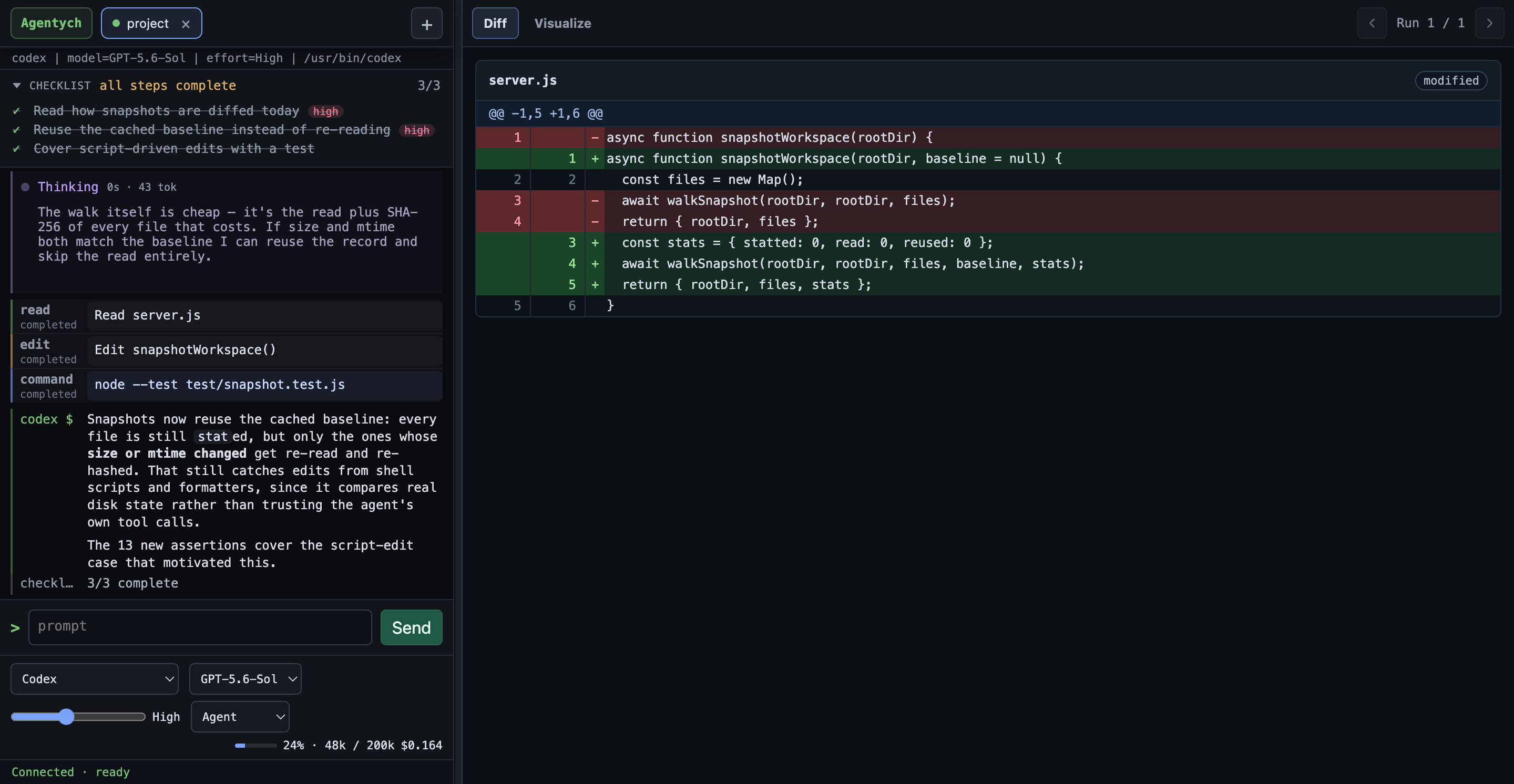
Agentych showing an agent's reasoning, its checklist, and a turn summary with token cost

One control bar, any provider

Provider, model, effort and mode in one row that works the same for every agent — even though Claude exposes effort as its own setting and Codex bakes it into the model id. Switch mid-session; your choice is remembered per provider.

See what it's thinking

Streamed reasoning collapses to the line it's on right now, expandable in full. The agent's checklist is pinned with live progress, so you always know which step it's on.

Know what it cost

Every turn ends with why it stopped, how long it took, tokens in and out, and the actual dollar cost — plus a link to the diff of every file it changed.

Run several at once

Each tab is its own agent session, optionally in its own git worktree, so two agents can work in parallel without stepping on each other.

Requirements

Agentych is a workspace, not an agent. It drives a CLI installed on your machine, so you need at least one of these — signed in:

Claude Code

npm install -g @anthropic-ai/claude-code

Then run claude once to sign in. Docs

Codex

npm install -g @openai/codex

Then run codex login once to sign in. Docs

If neither is installed, Agentych opens on a setup screen with these commands and a re-check button — nothing is installed behind your back.

Opening an unsigned build

These builds aren't code-signed yet, so both operating systems will warn you the first time. One-time steps:

macOS

Right-click Agentych in Applications → Open → Open. Or, if macOS refuses outright:

xattr -dr com.apple.quarantine /Applications/Agentych.app

Windows

SmartScreen will show "Windows protected your PC" → More infoRun anyway.

The Windows build hasn't been through a full manual test pass yet.